
Free trance gate
Lucka
A step gate for rhythmic chops. Free.
VST3, AU, Standalone. macOS and Windows.
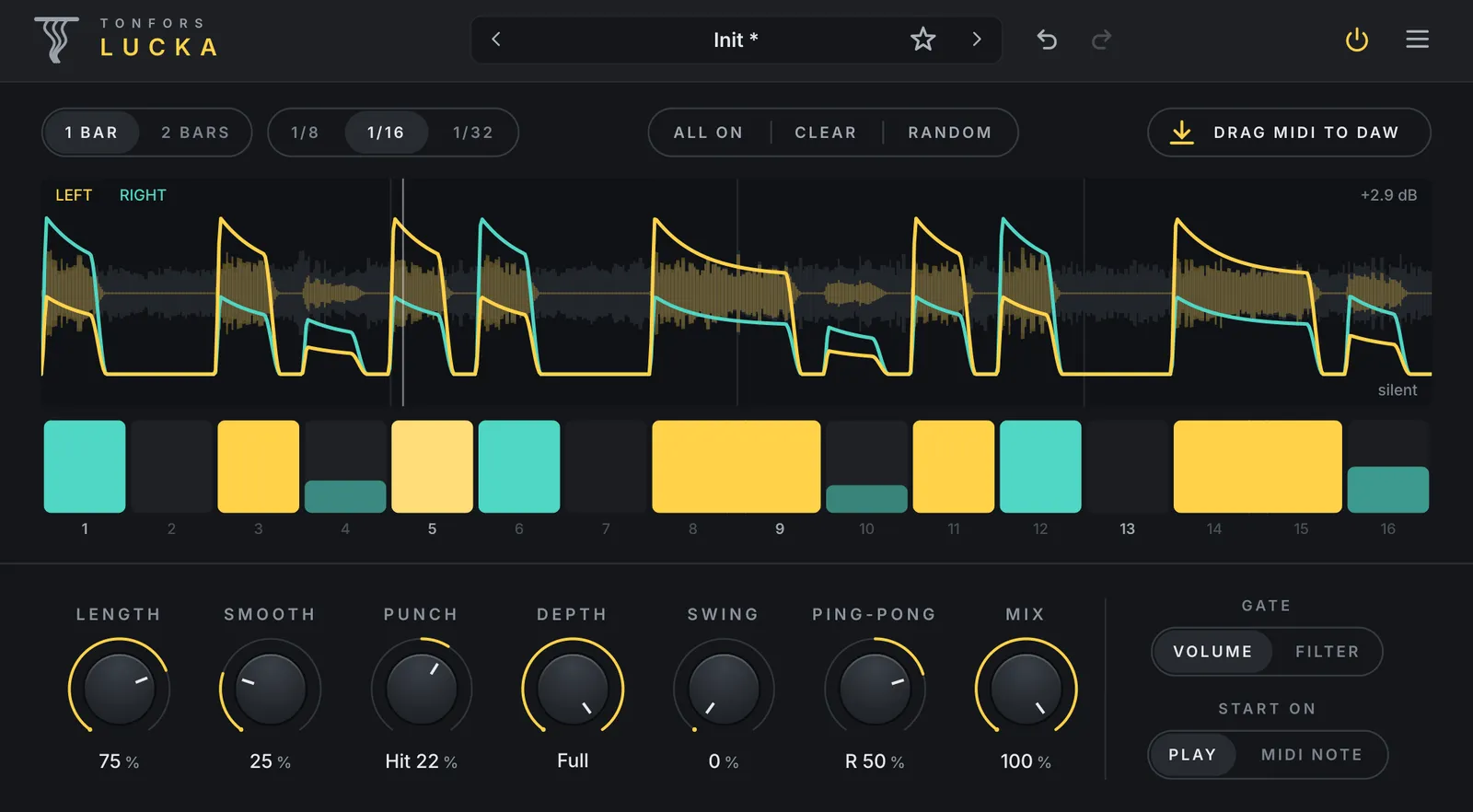
Lucka chops a sound into a rhythm. Draw a pattern of steps, and the gate opens and closes in time with your track, from straight 16ths to swung grooves, off-beat stutters and stereo ping-pong.
It runs at zero latency and never adds a click, and the scope shows the shape you hear.
It is free. Tell us where to send the download link and it is yours.
- Draw the pattern
- Click a step to turn it on or off, drag across steps to draw one longer opening, and drag up or down on a step to set its level. All on, Clear and Random give you a quick start.
- One or two bars
- Steps of 1/8, 1/16 or 1/32, over one bar or two, following your host’s tempo. Swing pushes every second step later, up to a triplet feel.
- Length, Smooth and Punch
- Length sets how long each opening stays open, Smooth fades its edges, and Punch makes its start hit harder or swell in. The level is made up, so the output stays as loud.
- Ping-pong
- Send the openings to alternate sides, from a light stereo movement to hard left and right. The pads and the scope show which side each opening plays on.
- Volume or filter gate
- Gate the volume, or open and close a low-pass filter for a darker, softer rhythm. Depth sets how far the gate closes, and Mix blends in the dry sound.
- Start on play or a MIDI note
- Follow your DAW’s playback, or start the pattern from step 1 each time a MIDI note is played, at your DAW’s tempo.
- Drag MIDI to your DAW
- Drag the pattern onto a track as a MIDI clip, to trigger other instruments or effects in the same rhythm. With ping-pong on, the clip pans each note to its side.
- Presets with undo and redo
- Factory patterns in eight groups, from classic gates to builds, stereo and filter patterns. Save your own, and undo or redo any change.
VST3, AU, Standalone for macOS (Apple silicon and Intel) and Windows 10 and 11 (64-bit). Works in any host that loads VST3 or Audio Units plugins, such as Ableton Live, Bitwig Studio, Cubase, FL Studio, Logic Pro, Reaper and Studio One.
What’s new
Lucka 1.0.4
- A new look, with the knobs on a raised panel.
- Ping-pong: a knob sends the openings to alternate sides.
- Punch hits or swells the start of each opening.
- Length sets how much of its step each opening stays open.
- Eight new Groove patterns, and the presets are regrouped.
- An ALL ON button that fills every gap, and a power button in the header.
- Everything is on one page, with no separate options panel.
Lucka 1.0.0
- First release.
Your download link always gives you the newest version, and older versions are on the same page if you need one.
Get Lucka free
Tell us where to send the download link. It works for macOS and Windows.